As an Amazon Associate, this website earns from qualifying purchases.
The best 3D printer under 400 depends on which feature your project needs. This group offers a choice of documented material paths, nozzle systems and color workflow. Start with that need, then check the exact configuration. A larger budget does not turn an unsuitable machine into the right one.
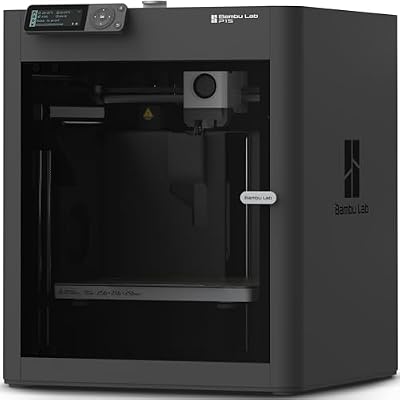
#1. Bambu Lab P1S
Bambu Lab P1S
Our verdict:
Enclosed ABS projects
Compare it for an enclosed machine with ABS and ASA in the maker's ideal-material list, within its stated build space.
View on Amazon - 256 × 256 × 256 mm build volume.
- Enclosed plastic and glass shell.
- Automatic bed leveling.
Keep in mind: Multicolor printing requires an AMS configuration, and a solo P1S does not include every optional feeder.
The P1S and A1 share the same specified build dimensions, exceeding the Adventurer 5M Pro and AD5X on every axis.
The P1S lists ABS and ASA as ideal materials, whereas the A1 does not recommend either.
Multicolor printing requires an AMS configuration, and a solo P1S does not include every optional feeder.
Carbon and glass fiber reinforced polymers are not recommended in the listed filament guidance.
#2. Flashforge Adventurer 5M Pro
- Enclosed 220 × 220 × 220 mm build volume.
- Tool-free quick-release nozzle mechanism.
- Built-in camera supports monitoring and time-lapse.
Keep in mind: The maker states that the Adventurer 5M Pro cannot be modified into a multicolor printer.
The camera supports live viewing and time-lapse. Flash Studio provides settings and status alerts.
Its filament table lists PLA and PETG with a 0.4 mm nozzle and TPU with a 0.6 or 0.8 mm nozzle.
The maker states that the Adventurer 5M Pro cannot be modified into a multicolor printer.
The listed filters are hardware features. They do not establish that a room needs no exposure controls.
#3. Flashforge AD5X
Flashforge AD5X
Our verdict:
Four-color projects
Consider it for four-color IFS projects; keep the single-color restriction for TPU95A in the decision.
View on Amazon - Four-color printing with the IFS module.
- 220 × 220 × 220 mm build volume.
- Automatic filament feeding and retraction.
Keep in mind: TPU95A is recommended for single-color printing.
A 0.4 mm nozzle comes installed. Optional nozzles are 0.25, 0.6 or 0.8 mm.
TPU95A is recommended for single-color printing.
The Adventurer 5M and 5M Pro cannot be converted to an AD5X using its IFS system.
#4. Bambu Lab A1
Bambu Lab A1
Our verdict:
Automatic calibration
Consider it for its stated build cube and automatic bed setup when Bambu permits the chosen material.
View on Amazon - 256 × 256 × 256 mm build volume.
- Automatic Z-offset and bed-leveling calibration.
- Active flow-rate compensation adjusts extrusion.
Keep in mind: Multicolor printing requires AMS lite through the A1 Combo or a separate purchase.
Its active flow rate compensation adjusts extrusion according to readings.
The A1 has a touchscreen. There is a quick-swap nozzle mount. Bambu also lists active motor noise cancellation.
Multicolor printing requires AMS lite through the A1 Combo or a separate purchase.
ABS, ASA, PC, PA, PET and carbon or glass fiber reinforced polymers are not recommended.
Third-party standard G-code slicers may lack some advanced features.
Factors to consider when choosing the best 3D printer under 400
Match the material guidance to your projects
The P1S lists ABS and ASA as ideal materials, whereas the A1 does not recommend them.
The Adventurer 5M Pro filament table specifies a 0.4 mm nozzle for PLA and PETG and a 0.6 or 0.8 mm nozzle for TPU.
Compare the specified build space
The P1S and A1 specify 256 mm on each build axis, compared with 220 mm for the AD5X and Adventurer 5M Pro.
Check the color configuration
The P1S requires AMS for multicolor printing, while the A1 requires AMS lite.
The AD5X supports four-color printing with IFS, while the Adventurer 5M Pro cannot be modified for multicolor printing according to its maker.
Choose the enclosed material path for the task
P1S and Adventurer 5M Pro are the enclosed choices in this set. Their retained maker tables list ABS and ASA. That is a reason to compare them if those materials are central to your project. The A1's maker does not recommend either material. A larger stated build cube does not remove that restriction.
Read the exact material's guidance as well as the printer's table. A heat limit is not a spool profile. Check the stock nozzle and plate. A product family may offer several nozzles, but a listing for one configuration does not prove that all of them are in the box.
Treat enclosure and room controls as separate decisions. A closed shell is a machine feature. It is not a certificate that every room suits the process. The NIOSH makerspace guide addresses the wider exposure plan. A filter specification alone does not settle it.
Decide whether you need color changes
The AD5X supports four-color printing with its IFS system. Plan a colored model before choosing for that feature. Check the sliced material use and any purge or support preview. A plain single-color part may give you no reason to add a color workflow.
Keep the AD5X separate from the Adventurer 5M Pro. The maker says that the Pro cannot be converted into an AD5X with IFS. A shared brand name does not make that an upgrade path. The P1S and A1 use their own AMS routes. Check the exact selected package before counting any feeder as included.
Flexible material needs a separate check. The AD5X guidance recommends TPU95A for single-color printing. Do not treat a color-system label as permission to feed every soft spool through that system. On the 5M Pro, the retained table gives nozzle-specific TPU advice. Resolve the material and nozzle together.
Check access as well as build space
The stated build dimensions let you compare files. They do not tell you how much clear desk space the complete setup needs. Keep room to open a cover or door, remove the plate and load material. Use the current setup guide for the exact machine and any feeder you intend to add.
For a part near an axis limit, inspect its sliced pose. Supports and print aids can use room beyond the bare model. If it needs to be split, plan the joint before choosing a smaller build space. A larger cube is useful only when the file and process need it.
Pick a nozzle system you can maintain
The 5M Pro's tool-free nozzle mechanism and the AD5X's nozzle options serve different buying questions. Neither makes a generic replacement part suitable. Keep the exact assembly name with your service notes. Follow the maker's shutdown and cooling steps before work on the hotend.
Start with the stock configuration if it meets the task. An optional nozzle can change the material route or the setup work. It also belongs in the complete purchase plan. Check which sizes the selected package includes before making a decision around one of them.
Use our A1 review for that model's supported limits. The filament guide covers a first spool, while the startup budget guide separates the machine from the rest of the workflow.
How We Picked
We checked each selected configuration for a new US offer below this page's strict ceiling. We compared supported material paths, stated build space and the equipment each choice needs. The purchase links refer to those configurations. Check the final package before ordering because offers can change.
We have not timed jobs or tested print finish. A catalog speed claim is not our own measurement. Where the catalog and maker excerpts disagree on a limit, we leave that number out of the recommendation. Use the exact unit's current instructions for operating settings.
Verdict on the best 3D printer under 400
Choose the best 3D printer under 400 around the required material and workflow. Consider the A1 for automatic bed setup. Compare the P1S for an enclosure and its listed ABS or ASA material path. Look at the AD5X for four-color IFS work. The Adventurer 5M Pro offers tool-free nozzle changes.