As an Amazon Associate, this website earns from qualifying purchases.
The best resin 3D printer depends on the whole process you can support. Start with the work area and exact resin instructions. Plan where to handle the liquid, wash the part and complete its cure. A printer that fits the file may still leave those tasks unresolved.
Our resin beginner guide covers the full workflow and its primary safety references. Read the current safety sheets for the resin and wash liquid you choose. A cover or low-odor claim does not settle the room controls. Complete that plan before buying or opening material.
#1. ELEGOO Mars 5
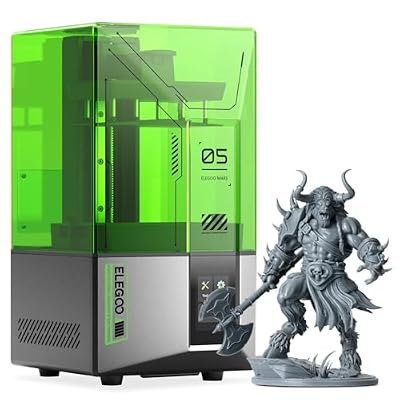
ELEGOO Mars 5
Our verdict:
Automatic leveling, USB
Compare its automatic setup and USB workflow when its stated build area fits the complete job.
View on Amazon - 143.43 × 89.6 × 150 mm stated build volume.
- 6.6-inch 4K monochrome LCD.
- Automatic leveling and USB transfer.
Keep in mind: Plan the exact resin, washing, curing and waste route; printer features do not complete that workflow.
The Mars 5 uses MSLA resin printing with a 405 nm light source. Its maker lists a 6.6-inch 4K monochrome LCD and a 143.43 × 89.6 × 150 mm build volume. These describe the exposure system and stated space, not a measured finish.
The maker lists automatic leveling and a self-check function. File transfer uses USB. Its listed slicers include Chitubox and Voxeldance Tango. Compare this workflow when you want automatic bed setup and can use the documented local-file route. The routine handling and care steps still apply.
#2. ELEGOO Mars 5 Ultra
- 153.36 × 77.76 × 165 mm stated build volume.
- Seven-inch 9K monochrome LCD.
- Wi-Fi transfer and built-in camera.
Keep in mind: Plan the exact resin, washing, curing and waste route; printer features do not complete that workflow.
The Mars 5 Ultra is a distinct model. Its manual gives a 153.36 × 77.76 × 165 mm build volume. The maker lists a seven-inch 9K monochrome LCD. Do not borrow the Mars 5 dimensions or infer a proven detail gain from the screen label.
The selected model lists automatic leveling, Wi-Fi file transfer and a built-in camera. Compare those features with the way you plan to send and check jobs. A camera does not replace the operator or establish that every fault will be detected. Check the network and software instructions for your own setup.
#3. Anycubic Photon Mono 4
- 153.4 × 87 × 165 mm stated build volume.
- Seven-inch 10K LCD.
- Four-point manual leveling and USB drive.
Keep in mind: Plan the exact resin, washing, curing and waste route; printer features do not complete that workflow.
This is the base Photon Mono 4. Its manual gives a 153.4 × 87 × 165 mm build volume and a seven-inch 10K LCD. Compare the full sliced job with those dimensions, including its supports. The screen specification alone does not establish the surface finish of a finished part.
The base model lists four-point manual leveling and USB-drive file transfer. Its listed slicer is Anycubic Photon Workshop. Compare that routine with your own work plan. Do not transfer Wi-Fi or other features from the separate Ultra model.
Factors to consider when choosing the best resin 3D printer
Compare the full sliced job
Start with a model you have permission to print. Set its intended size and use the exact machine profile. Inspect its orientation and supports. Check the whole job against the build area, rather than comparing the longest model edge alone.
Keep the wash and cure arrangement in the same check. A large part needs a documented way to complete those stages too. Check access to handle the platform and part as the maker directs. The closed machine's outside size is not the full work area.
For a hollow design, follow the resin and machine guidance for draining and cleaning it. Do not treat an outer shell that looks finished as proof that all inner material was processed. Start with a design whose full workflow you can inspect.
Compare each axis rather than one size label
None of these three has the greatest stated space on every axis. The Mars 5 has more stated depth, but less width and height than the other two. The Mono 4 has more depth than the Ultra. Keep those axes in view when placing a model or a group of parts.
For several pieces, inspect the arrangement in the slicer rather than adding their widths on paper. Supports and the chosen pose can change the useful layout. If a file has mating parts, preserve their relative scale. Reducing one piece to fit can change how the set goes together.
A tall narrow model and a spread of low parts can lead to different choices. Use the actual file for both checks. Do not choose a larger label without checking which dimension the job needs. The listed space is a starting limit, not proof that every shape within a simple box will print as intended.
Read resolution labels with their limits
Screen pixel count, XY pitch and layer height describe different parts of the setup. A large K number alone is not a measured detail result. Compare the relevant dimensions with the feature you want to make. Do not treat the layer setting as a promise about every surface.
The resin and slice belong in the job record. Record later finish work too. Save the profile with the file version. A setting copied from another model is not a checked profile for your machine. Use the maker's current guidance for the exact combination.
Plan washing and curing before ordering
Identify the exact resin and its current safety sheet. Find its wash method and post-cure instructions. Check which equipment and liquids those steps require. Keep those items separate from the printer package so that missing supplies are clear.
There is no single cure time or wash liquid for every resin. Follow the named material's instructions and the process equipment guide. Do not infer that water-washable means harmless or suitable for drain disposal. Confirm the waste route for used liquid and contaminated supplies before starting.
The printer-cost guide helps separate a machine purchase from the rest of the setup. Keep replacement consumables and routine care on the list. A qualifying printer offer does not mean that the complete process has no other expense.
Give handling and access their own plan
Lay out the route from bottle to printer, then to wash and cure. Keep clean controls separate from wet handling. Read the exact safety sheets for suitable protection and room controls. Follow the maker's instructions for storage and spill response as well.
Resolve access before the first job. Keep children and pets out of the handling area, and follow the documented operating limits. Automation does not remove liquid handling. A camera view is not a substitute for the required checks around the machine.
Keep the first job record complete
Save the original model apart from the printer-ready file. Record the machine, resin and profile used to create it. If the resin maker gives different guidance for first layers and later layers, keep those fields distinct. Do not turn one listed exposure setting into a rule for the whole file.
Include the wash and cure instructions for that exact material. Keep the relevant guide version or date with the record so that a later change is visible. A shared project can carry another person's settings. Check them against your own setup before sending the file to the machine.
Make a place to note what you can inspect after the job. A sound-looking outer surface does not prove a load rating, skin-contact use or food-contact use. Leave such uses out unless the exact material and process have the required support. A decorative display project should not silently become a part with those demands.
Check care and replacement parts
Read the plate and tank care steps for the exact model. Find the named replacement film and other routine consumables. Do not assume that a part for another model fits because its screen size looks similar. Check the complete part identity and installation instructions.
Before ordering, find the maker's support route for the exact model and your market. Check how to obtain its named routine consumables. A model-family page may cover several parts that do not fit each other. Save that route with the machine guide.
Leave access for the documented shutdown steps. Allow room for cleaning and inspection too. Do not plan the table around a closed product photo alone. If you cannot carry out the full care routine in the proposed space, resolve the layout before ordering.
How We Picked
We checked three distinct complete-printer offers for qualifying new US availability. We compared their exact model identities with current catalog facts and the supplied maker specifications and manuals. The base Photon Mono 4 is separate from the Ultra. The over-ceiling Saturn selection is not included.
We have not tested these printers or compared finished detail. Listed screen and build figures are specifications. They do not establish safe room conditions or a complete resin process. Check current package contents and the exact machine and material guides before buying; offers can change.
Frequently asked questions
Do 3D printers use resin?
The ELEGOO Mars 5 uses MSLA resin printing.
What software do you need for 3D printing?
The ELEGOO Mars 5 lists Chitubox and Voxeldance Tango as slicers.
The ANYCUBIC Photon Mono 4 lists Anycubic Photon Workshop as its slicer.
Check software compatibility with your chosen printer before planning your workflow.
Verdict on the best resin 3D printer
Choose the best resin 3D printer around a complete process you can operate. Compare the Mars 5's automatic setup, the Ultra's file and camera features, and the base Mono 4's manual setup and USB route. Resolve washing, curing and waste handling before treating the printer as a complete purchase.